
 Melky
Melky 
Googlebot doesn't scroll: Understanding the 12,000 Pixel render & Its impact on your SEO

You spend hours crafting a compelling content marketing strategy, optimizing every page, and building links. But what if some of that hard work is invisible to the very search engine you’re trying to impress?
There is a common misconception about how Googlebot “sees” your pages, and understanding this is key to ensuring your content is crawled and indexed effectively.
The 5 Search engine tips I’m unpacking:
When Googlebot crawls your site, it doesn’t scroll like a human, but it does render up to ~12K vertical pixels, about 20 times the height of a typical phone screen.
If your content only loads into the DOM after scrolling (e.g., via scroll-triggered JavaScript), it likely won’t get crawled. But if it’s present in the initial DOM or loaded during render (no interaction required), you’re probably good to go.
You can always verify in Google Search Console’s URL Inspection tool to see what Googlebot sees.
What this means and why it matters.
1. Googlebot crawls, then renders (But doesn’t scroll)
First, understand the two key phases Google uses:
-
Crawling: Googlebot requests your page’s URL and downloads the initial HTML source code. This is like getting the basic blueprint of your house.
-
Rendering: To understand pages that rely heavily on JavaScript, Googlebot uses a version of the Chrome browser (the Web Rendering Service or WRS) to execute the JavaScript and CSS, effectively building the page much like a user’s browser would. This is like building the house from the blueprint, painting the walls, and putting in the furniture.
Crucially, Googlebot doesn’t simulate human interaction like scrolling. It essentially loads the page and takes a ‘snapshot.‘
2. The 12,000 Pixel “Snapshot”
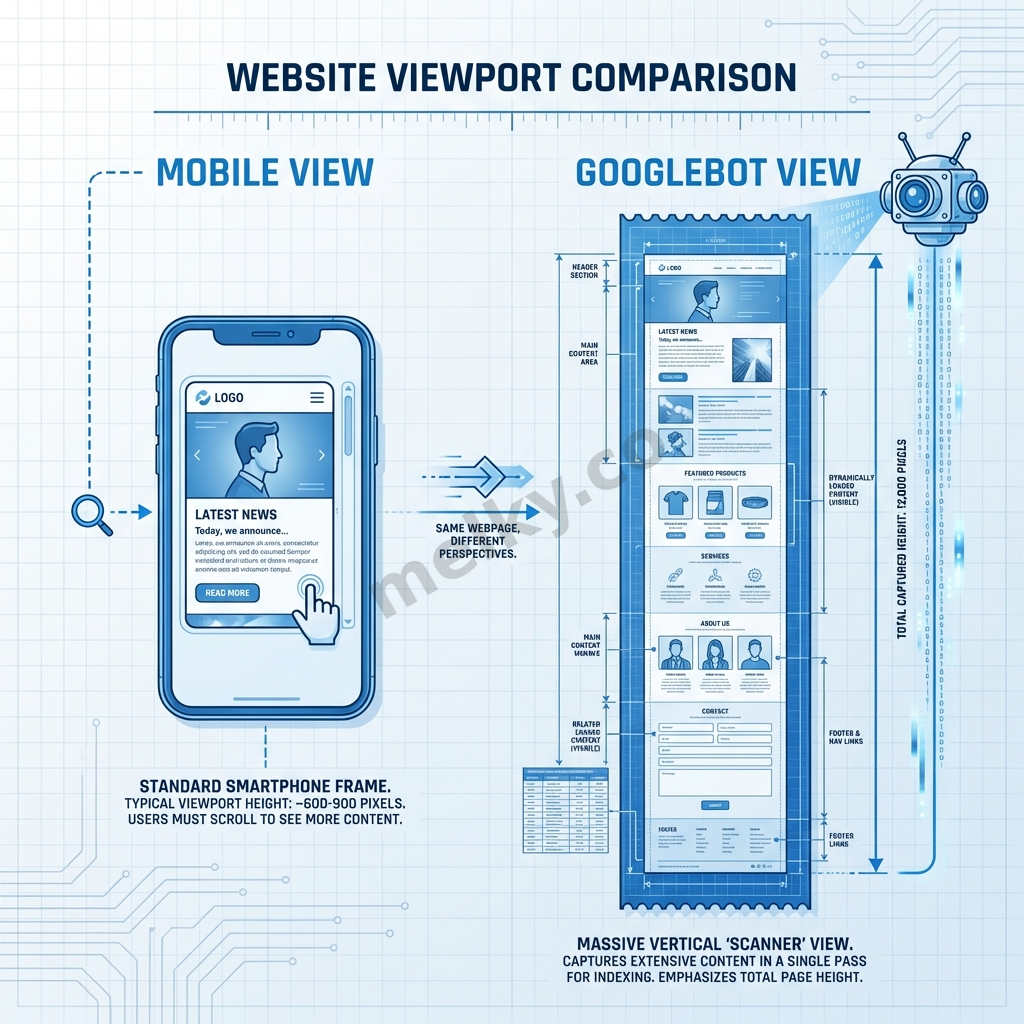
While Googlebot doesn’t scroll down the page progressively like a human, it doesn’t just render the tiny “above the fold” area either. It renders the page within a very tall virtual viewport – currently estimated to be around 12,000 vertical pixels.
-
Think of it: A typical smartphone screen might be 600-800 pixels tall. 12,000 pixels is roughly 15-20 times that height.
-
What it means: Googlebot can “see” a significant amount of content that appears far down the page, as long as it’s loaded during that initial render process_._
3. The Problem: Scroll-triggered content loading
This is where many websites run into trouble, often unintentionally. Modern web development often uses techniques to improve performance and user experience, like:
-
Lazy Loading: Delaying the loading of images or content sections until the user scrolls near them.
-
Infinite Scroll: Loading the next batch of content (e.g., products, articles) only when the user reaches the bottom of the current content.
-
JavaScript Animations/Content Reveal: Content that only fades in or appears when the user scrolls to a specific point.
Why this is not good for SEO: Content that Googlebot cannot ‘see’ (render) cannot be indexed. If that hidden content contains important keywords, valuable information, or internal links, you’re losing out on potential SEO benefits.
4. The Solution: Ensure Content Loads During Initial Render
To ensure Googlebot indexes your content, it needs to be available without requiring a scroll interaction:
-
Best: Include the content directly in the initial HTML source code served by your server. This is the most foolproof method.
-
Good: Use JavaScript to load and insert the content during the initial page load and rendering phase. This means the JS should execute and add the content to the DOM automatically, without waiting for a scroll trigger.
-
Example: Fetching data from an API and displaying it as soon as the page loads.
-
Lazy Loading Done Right (for SEO): Implement lazy loading based on the initial viewport or slightly beyond (using techniques like the IntersectionObserver API configured appropriately), ensuring content within that large ~12,000px render window does load automatically, even if content further down might still be deferred (though this carries risk if the 12k estimate changes). The safest bet for crucial content is loading it without scroll dependency.
-
The key is that the content must be present in the rendered DOM after Googlebot finishes its initial rendering pass within that tall viewport.
5. Verification is Your Best Friend: Google Search Console
Don’t guess! Google provides the perfect tool to check what it sees:
-
Go to Google Search Console.
-
Enter the URL of the page you want to check into the URL Inspection tool at the top.
-
Click “Test Live URL**”** to get the most up-to-date information.
-
Once the test is complete, click “View Tested Page”.
-
Check the “Screenshot” tab: Does it show the content you’re concerned about, even if it’s far down the very long screenshot?
-
Check the “HTML” tab: This shows the rendered HTML (after JavaScript execution). Search within this code (Ctrl+F or Cmd+F) for unique text snippets from the content in question. Is it present?
If the content appears in the screenshot and/or the rendered HTML, Googlebot can see it, and you’re likely okay. If it’s missing, you have a problem to fix.
Share Article
If this article helped you, please share it with others!
Some content may be outdated